

G’day! Let’s talk about some top-notch AI tools that can help you create fantastic content quickly. We’ll go through these tools one by one, explaining what they do and how much they cost in dollars.
AI in Making Content
More and more people are using AI to help make content. It’s getting better all the time. Businesses and people who write a lot are starting to use AI tools to help them work faster, come up with ideas, and make lots of content quickly. But it’s important to know what’s good and not so good about using AI to make content.
What Makes the Best AI Content Generator?
When you’re looking for a good AI content generator, you want to find one that:
- Lets you “teach” the AI so it writes the way you like
- Has extra features like keyword analysis or idea generators
- Fits your budget – there are paid plans and some free options too
Now, let’s dive into these AI writing tools. You’re bound to find one or two that’ll help you create original content at lightning speed.
1. Anyword

Anyword is an AI copywriting tool that uses predictive analytics to help you create more effective marketing copy. Anyword AI content generator offers a wide range of content types, including social media posts, blog posts, email subject lines, and more. One of Anyword’s unique features is its predictive performance score, which estimates how well your copy will perform based on data from similar successful campaigns. This can be particularly helpful for optimizing your marketing messages. Anyword also offers customizable templates and the ability to train the AI on your brand voice, helping to ensure consistency across your content.
Price: Anyword offers a 7-day free trial. Their paid plans start at about 39 dollars per month for the basic plan, with higher-tier plans offering more advanced features.
Good points:
- Predictive performance scoring
- Wide range of content types
- Can be trained on your brand voice
- Offers customizable templates
Not-so-good points:
- More advanced features only available on higher-tier plans
- May require some trial and error to get optimal results
2. Neuroflash

Neuroflash is an AI content generator that uses neurolinguistic programming (NLP) techniques to create engaging and persuasive content. It offers a wide range of content types, including blog posts, social media content, and marketing copy. One of Neuroflash’s standout features is its focus on emotional language and persuasive writing techniques. It aims to create content that not only informs but also engages readers on an emotional level. Neuroflash also offers a unique feature called “Neuroscore,” which evaluates the emotional impact and persuasiveness of your content.
Price: Neuroflash offers a free plan with limited features. Their paid plans start at about 49 dollars per month, which includes access to all content types and unlimited generations.
Good points:
- Focus on emotional and persuasive content
- Unique “Neuroscore” feature
- Wide range of content types
- Offers a free plan
Not-so-good points:
- May require more editing for factual or technical content
- Pricing may be high for individual users or small businesses
3. AI Writing Assistant

This tool, made by Copymatic and available from the Semrush App Center, is a real beauty. AI Writing Assistant got 76 different tools to help you write all sorts of things like emails, blogs, social media posts, ads, and even job descriptions. And get this – it can do all that in more than 25 languages! How’s that for impressive? To use the AI Article Generator, you just put in a headline, some subheadings, and your target keywords. Then, quick as a flash, it puts together a full article in less than 15 seconds. It even gives you an SEO score and tells you how to make it better.
Price: You can try it for free for seven days with no limits. After that, it’s about 38 dollars a month to keep using it as much as you like.
Good points:
- Lots of free AI writing tools
- Works in heaps of languages
- Quick and easy to use
4. Ink
Ink is an AI-powered writing platform that combines content creation with SEO optimization. It offers a wide range of content types, from blog posts and product descriptions to social media content and ad copy.
One of Ink’s unique features is its AI SEO optimization, which provides real-time suggestions to improve your content’s search engine performance as you write. It also offers a readability score to help ensure your content is easy to understand.
Ink includes a plagiarism checker and an AI art generator, making it a comprehensive tool for content creation.
Price: Ink offers a free plan with limited features. Their paid plans start at about 59 dollars per month, billed annually, which includes unlimited AI writing and SEO optimization.
Good points:
- Combines AI writing with SEO optimization
- Includes readability scoring
- Offers plagiarism checking and AI art generation
- Provides a free plan
Not-so-good points:
- More expensive than some competitors
- Advanced features may have a learning curve for new users
5. AI Social Content Generator

This one’s all about social media content. You can make single-image posts, memes, videos, and those fancy carousel posts. First up, you make your “brand page” by adding your logo and choosing how you want your posts to sound. You can save your social media handles and website too, so they’re easy to add to your AI-generated images. Then, you just tell it what you want to post about, and it’ll whip up a first draft for you. If you don’t like what you see, you can give it a thumbs up or down to get another option. You can change the text, add your own pictures, or use the ones it gives you. There are lots of options, which might seem a bit much at first, but it means you can make your posts just the way you want them.
Price: You can try it for free for 7 days, but you’ll need to give your credit card details. After that, it’s about 53 dollars a month to manage up to two brands and make 200 posts a month.
Good points:
- Makes all sorts of posts, like text, memes, and carousels
- Uses your brand’s look
- Lots of ways to customise your posts
Not-so-good points:
- The AI-made content might need some editing to make it sound just right
- Might take a bit of time to learn if you’re not used to design tools
6. Copysmith

Copysmith is an AI-powered content creation tool designed for e-commerce businesses, marketing teams, and agencies. It offers a wide range of templates for various content types, including product descriptions, ad copy, blog posts, and more.
One of Copysmith’s standout features is its ability to integrate with popular e-commerce platforms like Shopify, making it easy to generate and update product descriptions at scale.
Copysmith also offers a collaborative feature, allowing teams to work together on content projects. It includes a content planner to help you organize your content strategy and a file organization system to keep your projects tidy.
Price: Copysmith offers a 7-day free trial. Their paid plans start at about 30 dollars per month for individuals, with higher-tier plans available for teams and enterprises.
Good points:
- Specializes in e-commerce content
- Integrates with popular e-commerce platforms
- Offers collaboration features for teams
- Includes content planning and organization tools
Not-so-good points:
- May be less versatile for non-e-commerce content needs
- Higher-tier plans can be expensive for small businesses
7. Click Up

ClickUp, mainly a project management tool, recently added ClickUp AI to its list of features. It’s a simplified use of AI. You can ask it to write basic marketing materials, like blogs, emails, and social media posts. There are also prompts for designers, engineers, and HR. The tool will ask for a little background information, and AI will do its thing. While these other departments may not have flashy and exciting copy, it’s a practical and creative use of AI. As for the writing tool itself, it’s okay. The AI responds well. It has built-in tone options or you can build your own. It doesn’t have an editing mode for any of the AI-generated text. If you want a rewrite, you need to tell the tool to do it instead of making the changes yourself.
There is a keyword group feature to help you build your content strategy, but the data and insights are pretty sparse.
The best benefit of the ClickUp AI is its place within the ClickUp Dashboard. The documents AI writes can be saved within specific project folders to provide requirements, design personas, and FAQs for team members.
Price: ClickUp has a Free Forever plan that’s full of features and works well. If you’re using the platform for yourself, you won’t feel like you’re missing out.
8. Peppertype.ai
Peppertype.ai is an AI-powered content generation tool designed to help marketers and content creators produce various types of content quickly. It offers over 35 content types, including blog ideas, social media posts, product descriptions, and more.
One of Peppertype.ai’s unique features is its persona-based content generation. You can create different personas for your brand or target audience, and the tool will generate content tailored to these personas.
Peppertype.ai also offers a content improver feature, which can help you enhance your existing content by suggesting improvements and alternative phrasings.
Price: Peppertype.ai offers a free trial with 10 credits. Their paid plans start at about 47 dollars per month for 50 credits (with each credit typically generating 400-500 words of content).
Good points:
- Wide range of content types available
- Persona-based content generation
- Content improvement feature
- User-friendly interface
Not-so-good points:
- Credit-based system may be limiting for high-volume users
- Quality can vary depending on the complexity of the topic
9. Lately

Lately isn’t trying to do everything like other tools, but it does social media really, really well. To get started, you link your social media accounts and tell Lately what platform will publish and schedule your posts. Lately can do it, but it also works with Hootsuite, HubSpot, and Sprinklr. You can ask the tool to create new content or give it existing content, like long blog posts, videos, webinars, and white papers, to turn them into social posts. You can choose a past blog or even a video. Lately’s AI is trained to pick out which pieces will be best for social media and engagement. Its AI will also learn to understand your tone. And it gives you several social post options for each long piece of content you provide.
Lately knows that AI’s first draft usually needs work. So the tool includes an AI Train-o-meter to train its AI and help you improve your post. For Instagram, the Train-o-meter will make sure you have hashtags, emojis, mentions, and an image. There’s a connection with Grammarly to save you from annoying typos. If you’re uploading video, Lately will pick out clips for social media and even write out what’s said in your videos. Once your post is ready, you can schedule it from the tool. Lately also offers a wealth of analytics and a management library, but it’s only available at the enterprise level.
Price: The standard 7-day free trial is available after you enter credit card information. It’s not a bad way to test the tool, especially if you already have long-form content ready to convert. You aren’t limited by the number of posts you can create, only by the number of social accounts.
The paid packages are pricey. The Starter plan is about 75 dollars a month if billed annually, and you can link one user seat and five social channels. The next tier is the Professional plan at about 242 dollars a month for up to 3 user seats and 15 channels, which is a big jump.
The Enterprise plan offers custom solutions and integrations for your organisation, but you’ll need to contact Lately for pricing.
Good points:
- Impressive AI tool for social media
- Make the most of existing content for better distribution
- Flexible scheduling options
Not-so-good points:
- Expensive starter plan
- Doesn’t generate social media posts without content you’ve submitted
- Not ideal for individual usage
10. Article Forge

Article Forge is an AI content generator that specializes in creating long-form content. It uses advanced AI and deep learning to generate articles on a wide range of topics. One of Article Forge’s standout features is its ability to create full articles with minimal input. You simply enter your main keyword and any secondary keywords, and the tool will generate a complete article, including relevant subheadings and paragraphs. Article Forge also automatically adds relevant images and videos to your content, and it can create content in multiple languages.
Price: Article Forge offers a 5-day free trial. After that, their plans start at about 37 dollars per month when billed annually, allowing you to generate up to 25,000 words per month.
Good points:
- Can generate full articles with minimal input
- Automatically includes images and videos
- Supports multiple languages
- Relatively affordable for long-form content generation
Not-so-good points:
- Quality can be inconsistent and may require significant editing
- Less control over the content structure compared to some competitors
11. Social Content AI
This is Semrush’s AI-powered tool for making posts for the big social media sites like Facebook, Instagram, Twitter (now called X), LinkedIn, Google Business Profile, and Pinterest. It looks at your website and suggests hundreds of social media ideas, making each post match your brand. You can easily make the words, pictures, and designs for any posts you want to create, and even schedule when to put them up. All you need to do is type in your website address and a quick description of your business. Social Content AI will come up with loads of ideas, and you can pick the ones you like. You can choose things like the tone, which platform to post on, and what type of post you want. It’ll give you eye-catching templates and pictures that go well with your company’s look, and write captions for you too.
Price: You can try it for free for seven days. After that, it costs about 46 dollars a month.
Good points:
- No need to think up ideas yourself – it makes content ideas and posts based on your website and description
- Works in more than 50 languages for coming up with ideas and making posts
- Can turn your existing website content into engaging social posts to bring in more visitors
Not-so-good points:
- Only for social media, not for other types of content
- Can’t make videos yet, as it’s new and still adding more features
12. Frase
Frase is an AI-powered content optimization tool that focuses on helping you create SEO-friendly content. It uses AI to analyze top-ranking content for your target keywords and provides suggestions to improve your content’s search engine performance. One of Frase’s unique features is its content brief generator, which creates detailed outlines based on top-performing content for your chosen topic. This can be incredibly helpful in structuring your content for maximum impact. Frase also offers an AI writing assistant that can help you generate content based on these briefs, as well as a question research tool to help you understand what your audience is asking about your topic.
Price: Frase offers a 5-day trial for about 1.50 dollars. After that, their plans start at about 61 dollars per month for a single user, with options for team accounts at higher price points.
Good points:
- Strong focus on SEO optimization
- Generates detailed content briefs
- Includes question research tool
- Integrates content optimization and AI writing
Not-so-good points:
- More expensive than some competitors
- Primarily focused on SEO, may not be as versatile for other types of content
13. Jasper
Jasper (which used to be called Jarvis AI) is a popular AI content generator, and for good reason. You start by giving it a command like “write” or “summarise”, add some details about who you’re writing for and why, and then watch it go to work. You can tell it about how your brand usually sounds, so the AI-generated content matches your existing stuff. It’s like teaching it to write and sound just like you. It’s also got a chat feature to help you brainstorm and do research before you start creating content. The chat can even help you put together a picture of your ideal customer, so Jasper can write content that appeals to them. What makes Jasper really shine is that it’s made with marketers in mind. It’s got features like workflows for emails, ads, and social media posts.
Everything about it is user-friendly. You don’t need to spend ages learning how to use it – you can jump right in and start creating content.
Jasper can even make pictures for your content, but they’re not super realistic.
They’ve also got something called Jasper Everywhere, which includes APIs and plugins to bring the writing tool to every part of your workflow. You can use AI while working in WordPress, Gmail, YouTube, Salesforce, and more.
Price: There’s a 7-day free trial, but you have to enter your credit card info to get it. After that, plans start at about 59 dollars a month.
Good points:
- Made specifically for marketers and writers
- The AI responds well and works with you, especially through the chat feature
- Easy to learn
Not-so-good points:
- Expensive if you’re not using it a lot
- Doesn’t have any tools for analysing or improving your content
- The AI-generated pictures are just okay
14. Rytr
Rytr is an AI writing assistant that aims to help you create high-quality content quickly and easily. It offers a variety of use cases, including blog idea & outline generation, social media posts, email writing, and more. One of Rytr’s standout features is its ability to write in different tones and languages. You can choose from over 30 tones (such as convincing, enthusiastic, or professional) and more than 30 languages, making it a versatile tool for global content creation. Rytr also offers a plagiarism checker to ensure your content is original, and a built-in image library to help you find relevant images for your content.
Price: Rytr offers a free plan that allows you to generate up to 5,000 characters per month. Their paid plans start at about 9 dollars per month for unlimited characters, making it one of the more affordable options on the market.
Good points:
- Affordable pricing with a generous free plan
- Supports multiple languages and writing tones
- Includes a plagiarism checker and image library
- User-friendly interface
Not-so-good points:
- May not be as advanced as some competitors for longer-form content
- Quality can be inconsistent, especially for more complex topics
15. GrowthBar

GrowthBar started out as an SEO Chrome extension and grew into a full-on writing tool in just three years. Not bad, eh?
Like other AI writers, it can generate blogs and has workflows for different types of content:
- Email newsletters
- Press releases
- Product descriptions
- Sales emails
- Idea generator
But what sets it apart is its blog outline tool. This helps you build an outline by focusing on your keywords and headlines. Why is this important? Well, having the right keywords in the right places (like your title, headlines, and subheadings) makes it easier for search engines to find and rank your content. You can write your own headlines or get inspiration from some of the top-ranking articles for your keyword. But remember, copying is a big no-no for SEO, so it’s best to use them as inspiration only. Once you’ve set your headlines, the tool will come up with bullet points for each paragraph. You can edit each line before letting the AI write the draft. Remember, AI works best when you give it a great prompt, and the blog outline sets up a really good prompt for the AI to use. Like Semrush’s SEO Writing Assistant (which we’ll talk about later), it scores your draft for SEO before you publish. But unlike the Writing Assistant, it doesn’t suggest ways to improve it. GrowthBar’s main product, the Chrome Extension, lets you take your SEO analyser everywhere you work, like WordPress or Google itself. When you’re on the Google Search page, you’ll see stats like how hard it is to rank for a keyword and how authoritative each website is. You can also teach the AI to write like you by uploading a description of your brand and examples of your content.
Price: GrowthBar offers a generous 14-day free trial. You can make two outlines and use AI tools 15 times.
To get more use out of it, the basic plan starts at about 55 dollars a month. With this, you can make 25 outlines a month and use AI tools 500 times – another generous offer.
Good points:
- Great SEO tool to make your writing better
- Blog Outline tool to get your headlines just right
- Easy to use
Not-so-good points:
- Focuses more on improving SEO than on improving your writing
- A bit expensive without all the features of similar tools
16. Writesonic
Writesonic is an AI writing assistant that can help you create various types of content, including blog posts, product descriptions, and ad copy. It uses advanced language models to generate human-like text based on your inputs.
One of Writesonic’s unique features is its article writer, which can create full-length blog posts on a given topic. It also offers a paraphrasing tool and a content expander to help you improve and lengthen your existing content.
Writesonic also provides an SEO-optimized content creation feature, which can be particularly useful for businesses looking to improve their search engine rankings.
Price: Writesonic offers a free trial that allows you to generate up to 10,000 words. After that, their plans start at about 16 dollars per month for up to 19,000 words. They also offer custom plans for higher volume needs.
Good points:
- Can generate full-length articles
- Offers SEO optimization features
- Includes tools for paraphrasing and expanding content
- Affordable starting price
Not-so-good points:
- Word limit on lower-tier plans may be restrictive for some users
- Quality can vary depending on the complexity of the topic
17. Scalenut
Scalenut has built its platform to guide you through the process of creating prompts for AI. They call it Cruise Mode. First, you make a keyword plan, which is a list of groups of keywords that you can use to create articles. The report even shows you how many people search for each keyword, so you can go after the popular ones. Then, you come up with a headline by giving a bit of information about your purpose and who you’re writing for. The next few steps focus on the outline. Like GrowthBar, you’ll work on section headlines, then bullet points for each section. It takes about five minutes to generate an article. Then you’ll get a basic SEO score and can go through each paragraph to rephrase, rewrite, shorten, or lengthen the text. If you’re happy with the draft, you can export it to the editor where you can really start making it better. It will even suggest improvements for you. Don’t overlook all the other short content types this tool can create. Scalenut has over 50 templates to help you produce everything from product descriptions to video scripts to your LinkedIn headline.
Price: The 7-day trial is easy to get you started, and you don’t need to enter credit card information to test the platform. You can create two SEO articles and have access to all the AI templates.
At the end of the trial, the Essential plan starts at about 29 dollars a month. The next tiers really open up your content creation with more articles, keyword groups, and access to integrations like one-click publish to WordPress.
Good points:
- Thoughtful Cruise Mode to prepare your article for AI
- Keyword grouping to build out a targeted content strategy
- Unique AI templates
Not-so-good points:
- Not as feature-rich as other AI writing tools
18. Copy.ai
Copy.ai is an AI-powered copywriting tool that can help you create various types of content, from blog posts to social media captions and even email subject lines. This tool uses GPT-3 technology to generate human-like text based on the prompts you provide. It offers a wide range of templates for different content types, making it easy to get started with your content creation. One of Copy.ai’s standout features is its ability to generate multiple versions of the same content, giving you various options to choose from. This can be particularly helpful when you’re looking for inspiration or want to experiment with different tones and styles.
Price: Copy.ai offers a free plan that allows you to create up to 2,000 words per month. Their paid plans start at about 49 dollars per month, billed annually, which gives you unlimited words and access to all features.
Good points:
- Wide range of templates for various content types
- Generates multiple versions of content
- User-friendly interface
- Free plan available
Not-so-good points:
- Quality can be inconsistent and may require editing
- More expensive than some competitors for unlimited use
19. SERP Gap Analyzer
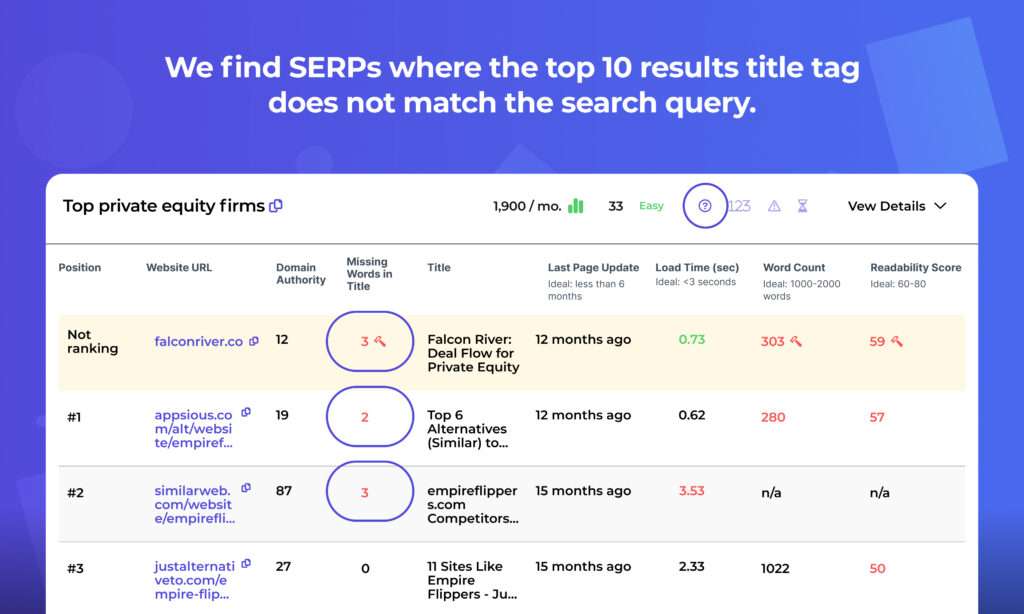
SERP Gap Analyzer helps you create content for SEO plans. There are various ways to use the tool, like making content briefs, titles, descriptions, and articles with the help of AI. When you go to the “AI Writing Tools” tab of the app, you can choose which type of content you’d like to generate. The content brief can be especially helpful if you’re working with a writer to create SEO-friendly articles. The brief will automatically outline your content with useful sections for:
- Content overview
- Content focus
- Target audience
- Outline
- Key questions
- Resources
- Required keywords
This brief can be given to a writer or even fed to another AI content generator. Either way, it’ll make sure your content is structured well and covers the topic completely. After you generate your content, everything will be saved for you to find later from each AI Writing Tool. One thing we like is the warning that comes when you generate an article. It reminds you that you should never publish an AI-generated article word for word on your website. Instead, take it as a solid first draft to then edit and improve with real examples, personal experience, and your own voice.
Price: The 7-day trial available from the Semrush App Center lets you test it out for a week.
At the end of the trial, the base plan starts at about 120 dollars a month.
Good points:
- Multiple tools in one
- Focused on an SEO-friendly content workflow
- Highly detailed content brief generation
Not-so-good points:
- Mostly focused on SEO, not as flexible for other creative AI content generation purposes like creative writing or social media
20. SEO Writing Assistant
SEO Writing Assistant, available on the Semrush platform, is the heavyweight of all of Semrush’s writing tools for both price and functionality. Let’s look at a few of the things this app can do. Starting with SEO, it breaks down all the categories that Google analyses (readability, originality, SEO, and tone) to determine how well it’s optimized for your keywords. To help you claim the top search result spot, SEO Writing Assistant will give you a score and suggestions to improve it. What do the suggestions look like? Correcting passive voice sentences to active, including more or different keywords, shortening the sentence length, improving headlines, and more. There are even plugins for Google docs and WordPress. You can use the optimizer while working in Google. SEO Writing Assistant also added an exciting new “Compose with AI” feature, so AI really does all the hard work. It will write the article, analyse it, and offer suggestions to make it high-quality and high-ranking.
Price: What does all of this speed, convenience, and SEO analysis cost? You’ll need a Semrush subscription to use SEO Writing Assistant. Plans start at about 213 dollars a month, but to unlock the list of product benefits, you’ll want to subscribe to the Guru plan, which starts at about 380 dollars a month.
If you’re a midsize business or agency and creating a lot of content, and want everything you produce to be top-notch, this tool might be worth your investment. You can request a 7-day free trial before committing to the monthly subscription.
Good points:
- The most comprehensive writing assistant in Semrush’s toolkit
- AI writes and analyses text for search optimization
- Easy plugins for Google docs and WordPress
Not-so-good points:
- More expensive than other tools listed
- Not ideal for businesses that aren’t regularly creating content
21. ContentShake AI

ContentShake AI is a clever AI writer that combines ChatGPT’s abilities with Semrush’s powerful SEO data. List keywords related to your business or topic, and ContentShake AI will suggest ideas for your content plan based on data. It sorts ideas by purpose, such as Commercial or Informational, and shows how well the topic can attract traffic. For example, a good topic will be easy to rank on Google and get a lot of searches each month. Choose a headline that works for you, and ContentShake AI will create a ready-to-rank article in one click. It will automatically integrate target keywords and competitive insights into your content. Then, you can add any changes and improvements using the built-in AI chat. Add images, rewrite text, expand your content, generate ideas and more. The app will also help you boost your content’s readability and tone of voice, and send your articles directly to WordPress. This tool is great for small teams (and teams of one) looking to generate organic traffic and leads without SEO expertise.
Price: You can explore the tool with a 7-day free trial.
The paid version costs about 91 dollars per month. It allows you to make unlimited SEO-friendly articles. You can also use the browser extension and receive weekly content ideas.
Good points:
- Creates SEO-rich, ready-to-rank long-form content
- Idea generation, article writing, and article optimization in one tool
- Publish directly to your WordPress site
- Measure the potential efficiency of your content
Not-so-good points:
- Higher cost per month than other writing tools
- Limited to long-form content and social media posts
Good Things About Using AI for Content
One of the best things about using AI to make content is that it’s fast. AI tools can write rough drafts, outlines, and even whole articles in just a few minutes. This saves a lot of time. It’s really helpful for businesses that need to make lots of content all the time, like online shops that need to describe lots of products, or news websites that write about many stories every day.
AI can also help when you’re stuck and don’t know what to write about. It can give you ideas and help you get started. It can look at what’s popular, suggest topics, and even give you different ways to think about a subject. This helps people who make content keep coming up with new ideas.
Another good thing is that AI can help your content show up better in search engines. Many AI writing tools are made to help with this. They can suggest good words to use, help organize your content well, and make sure it follows the rules that search engines like. This can help businesses get more people to visit their websites.
Things to Watch Out For
Even though using AI to make content has many good points, it’s important to know what it can’t do well. AI-made content sometimes doesn’t have the deep understanding or personal touch that a human writer can give. It might have trouble with hard topics, words that only some industries use, or writing that needs to understand how people feel.
There’s also a chance that AI might make content that sounds the same as lots of other content if you don’t guide it well or check its work carefully. This can make your content boring and might not show what makes your business special.
It’s also important to think about what’s right and fair when using AI to make content. People are talking about who owns the content that AI makes, whether AI might copy some of the unfair ideas people have, and how it might affect human writers.
Good Ways to Use AI for Content
To get the most out of AI content tools while avoiding problems, try these ideas:
- Use AI to help, not to do everything: Think of AI as a helper, not something to replace human ideas and knowledge. Use it to get ideas, make first drafts, or do simple writing tasks, but always check and improve what it makes.
- Keep your own style: Many AI tools let you tell them about your business’s style or teach them using your old content. Use these features to make sure the AI-made content sounds like your business.
- Check facts and edit: Always look over AI-made content to make sure it’s right, fits what you need, and is good quality. Check any facts or numbers it gives, and be ready to change a lot of it if you need to.
- Use AI and human know-how together: For the best results, use both AI-made content and human knowledge. Have experts look at and improve the content, adding insights, examples, and details that AI might miss.
- Keep learning about AI: AI is changing fast. Keep learning about new things it can do and good ways to use it to make sure you’re using AI content tools well and fairly.
The Future of AI in Making Content
As AI gets better, we’ll probably see even smarter content-making tools in the future. These might be better at understanding context, writing longer pieces, and making content that fits each reader better.
But people will still be really important in making content. While AI can do many parts of making content, human creativity, understanding of feelings, and smart thinking will still be key to making really good and effective content.
In the end, AI content tools offer exciting possibilities for people who make content and do marketing. By understanding what these tools can and can’t do, and using them thoughtfully along with human know-how, businesses can use these tools to make their content better and get better results.