

Here is something that happens in boardrooms more often than anyone admits: a company runs an AI pilot, it impresses everyone, and then nothing ships. Six months later the project is quietly archived. The demo worked. The production system never existed.
That gap—between a working prototype and a live system that creates measurable business value—is where most AI investment gets lost. It is not a technology gap. It is an execution gap. The companies closing it are not the ones with the biggest AI budgets; they are the ones treating AI development as a product discipline, not an experiment.
This guide walks through what professional AI software development services actually cover—from the first strategy workshop to a production system running under real load—so you can evaluate partners, plan realistically, and make decisions that hold up past the demo stage.
What Are AI Software Development Services?
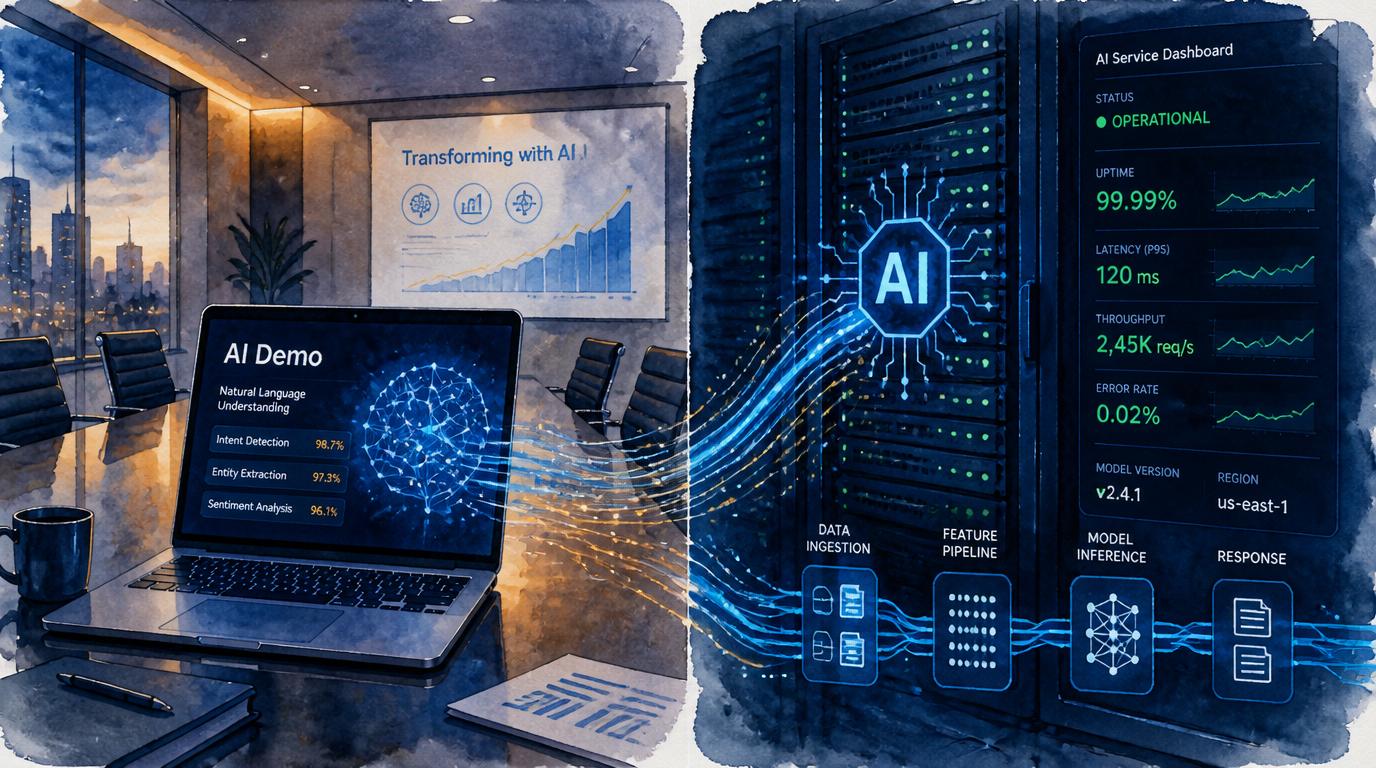
The term covers a wide range of activities that companies often confuse with each other. At its core, AI software development means designing, building, and operating software systems where AI models do meaningful work inside a production environment—not just generating text in a sandbox.
A full-service engagement typically spans eight distinct areas:
- AI strategy workshops — defining where AI creates value in your specific business, and which use cases to prioritize first
- Use case discovery — mapping existing workflows to identify automation opportunities with quantifiable ROI
- Data readiness assessment — auditing available data for quality, volume, labeling, and regulatory constraints
- Product design — designing the human-AI interaction layer so the system is actually used, not tolerated
- Model selection and development — choosing between off-the-shelf APIs, fine-tuned models, or custom training based on your requirements
- Systems integration — connecting AI outputs to CRMs, ERPs, databases, and downstream workflows
- Production deployment — setting up infrastructure, CI/CD pipelines, monitoring, and SLA controls
- Ongoing optimization — monitoring model performance, managing drift, retraining on new data, and controlling inference costs
Most vendors do some of these well. Fewer do all of them. The distinction matters because the steps you skip in early phases always show up as expensive problems in later ones.
Where Businesses Use AI Today
The use cases that generate the most consistent ROI are not the ones getting the most press coverage. They tend to be high-volume, repetitive tasks where the cost of each transaction is known and the improvement from automation is measurable within weeks.
- Customer support deflection — AI agents that handle tier-1 queries, reducing cost per resolution by 40–60% in mature deployments
- Document processing — extracting structured data from invoices, contracts, claims, and intake forms at scale
- Sales enablement — lead scoring, next-best-action recommendations, and meeting summary generation
- Demand and revenue forecasting — models that outperform spreadsheet-based projections with less analyst time
- Fraud and anomaly detection — real-time pattern recognition in transaction streams and access logs
- Personalization engines — recommendation layers in SaaS products, e-commerce, and content platforms
- Workflow automation — routing, triage, and approval chains that previously required human judgment at every step
- Internal copilots — knowledge retrieval systems built on proprietary data, replacing hours of internal search and escalation
If your team builds SaaS products, several of these—especially personalization and internal copilots—can be implemented as distinct product features rather than standalone infrastructure, which significantly changes the build approach.
Phase 1: AI Strategy and Opportunity Mapping
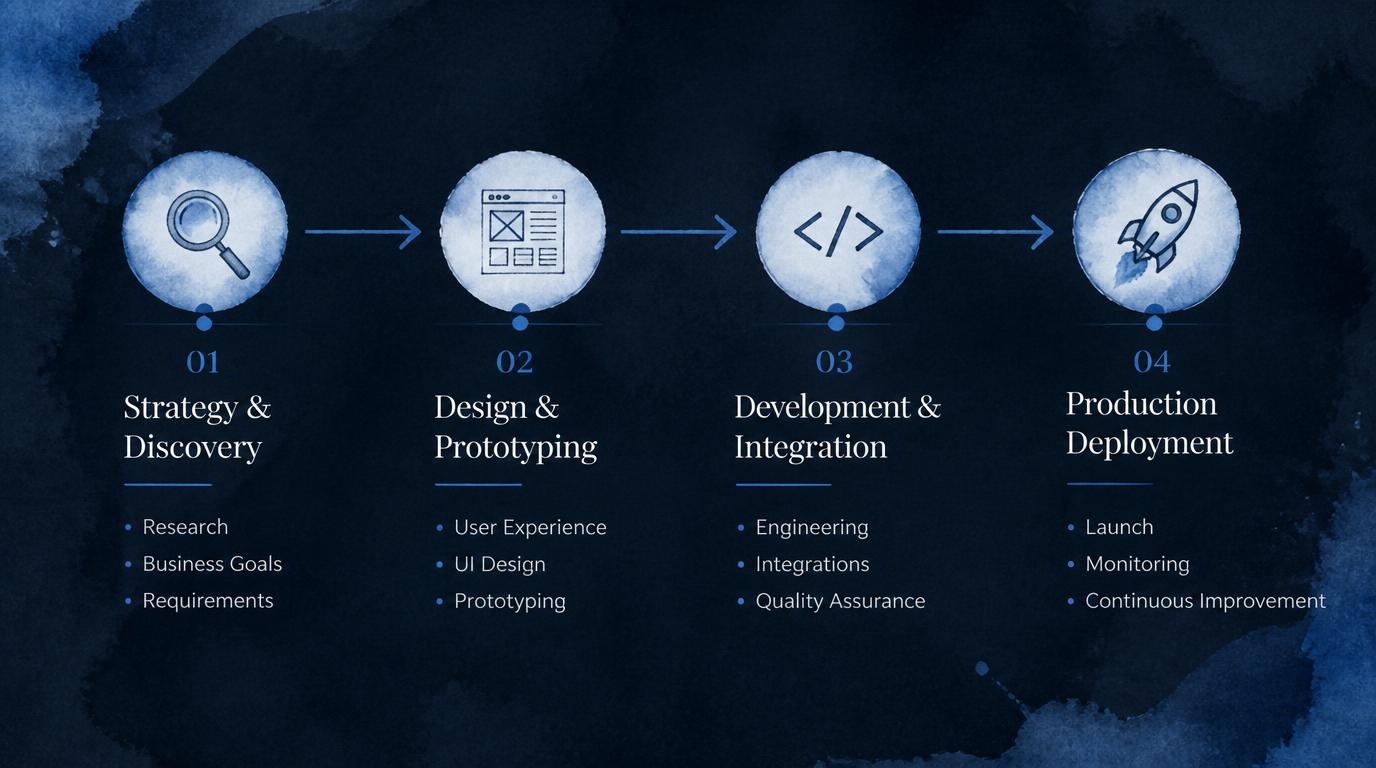
The most expensive mistake in AI development is building the wrong thing with confidence. Strategy work is not a formality—it is the phase that determines whether you spend the next six months building something that changes your unit economics, or something that becomes a case study in what not to do.
Identify High-ROI Use Cases
Start with processes that have three characteristics: high volume, predictable inputs, and a clear cost-per-transaction baseline. These are the cases where the ROI math is defensible before a line of code is written. Avoid starting with open-ended generative applications—they are harder to measure and harder to justify to finance teams.
Evaluate Data Availability
No model is better than the data it learns from or reasons over. A data readiness assessment should answer: Do you have enough historical examples? Is the data labeled consistently? Is it stored accessibly, or scattered across legacy systems? Does it contain PII that creates regulatory constraints? Bad answers here do not kill a project, but they change the timeline and cost projections significantly.
Prioritize Quick Wins vs. Long Bets
A healthy AI roadmap contains both. Quick wins—typically 8–12 week builds using existing APIs on well-scoped use cases—generate internal credibility and fund more ambitious work. Long bets—custom-trained models, multi-system orchestration, novel interaction paradigms—require political capital that quick wins build. Skipping the quick wins and going straight to the ambitious project is a common reason projects lose executive support halfway through.
Define KPIs and ROI Metrics Before Development Starts
This sounds obvious. It rarely happens. Define the metrics you will use to declare success before the first sprint—cost per ticket resolved, document processing time, conversion rate, fraud caught per dollar spent. Without pre-defined metrics, every demo looks like a win and every production rollout is impossible to evaluate honestly.
Phase 2: Product Design and Prototyping
AI features fail in production for two reasons: the model underperforms, or users do not trust it enough to act on its outputs. UX and product design work addresses the second problem—which is, in practice, the more common one.
Good AI product design considers:
- Where in an existing workflow the AI output surfaces—and how it competes with current habits
- How confident the model needs to be before showing a recommendation without a human review step
- What feedback mechanisms let users correct AI errors, generating training data in the process
- How the interface communicates uncertainty—showing a 73% confidence score is not the same as showing a high/medium/low badge, and both affect adoption differently
- What happens when the model gets it wrong—and how that failure mode is communicated to the user without destroying trust in the system
The proof of concept phase exists to answer these questions with real users, not to prove the model works in a notebook. By the end of this phase, you should have a working demo, a set of edge cases that surfaced in testing, and a clear decision on what architecture the production system needs.
Phase 3: Development and Systems Integration
This is where AI software development separates from AI experimentation. Building a model is one skill. Integrating it into a live system—with real data pipelines, authentication, error handling, and existing business logic—is a different one entirely.
A production-grade AI build covers:
- Frontend and backend systems — the interfaces users interact with and the APIs that power them, whether that is a new product surface or an embedded feature in an existing platform
- CRM and ERP integrations — connecting AI outputs to Salesforce, HubSpot, SAP, or custom internal systems via REST APIs, webhooks, or middleware
- Data pipelines — ingesting, transforming, and routing data to and from models in real time or batch, depending on latency requirements
- Vector search layers — for RAG (Retrieval-Augmented Generation) architectures that ground LLM outputs in proprietary company knowledge
- Security controls — authentication, authorization, encryption in transit and at rest, and PII handling at every layer
- API orchestration — managing calls to multiple model providers or internal services with fallback logic and cost controls
If you are building on a mobile platform, the integration complexity multiplies—you are now managing model latency within a user experience that has a 300ms tolerance for feeling slow.
Phase 4: Production Deployment
This is the phase that most AI demos never reach. It is also the phase that determines whether AI creates value or becomes a line item on a project post-mortem.
Cloud Setup
Containerized services on Kubernetes, scalable inference endpoints, environment separation (dev / staging / prod) with identical configs.
CI/CD for AI Systems
Model versioning, automated regression testing on held-out datasets, gradual rollout (canary / blue-green) with performance gates before full traffic.
Monitoring & Logging
Latency tracking, token usage, error rates, and model-specific metrics—output distribution shifts, confidence calibration, hallucination rates—alerting when thresholds break.
Human Review Flows
Defined thresholds below which AI outputs route to human review before action. Feedback capture for continuous improvement. Escalation paths for edge cases the model was not trained on.
Cost Optimization
Prompt caching, model routing by task complexity (smaller models for simple tasks), batching strategies, and inference cost dashboards tied to revenue metrics.
Reliability & SLAs
Uptime commitments, graceful degradation when model endpoints are unavailable, retry logic, and incident response runbooks specific to AI failure modes.
AI Technologies Used in Modern Delivery
The model is rarely the most interesting engineering decision. It is the architecture around the model—how data moves, how outputs are grounded, how the system handles uncertainty—that determines whether an AI product is usable or just impressive in a controlled setting.
Technologies commonly used in production AI systems today:
- Large language models (LLMs) — GPT-4o, Claude, Gemini, Llama 3, Mistral, via API or self-hosted, depending on latency and data residency requirements
- Machine learning models — gradient boosting (XGBoost, LightGBM) for tabular data prediction, classification, and scoring tasks where LLMs are overkill
- RAG architectures — retrieval-augmented generation that combines vector search over proprietary knowledge bases with LLM synthesis, dramatically reducing hallucination rates for enterprise use cases
- OCR and vision AI — document parsing, image classification, and multi-modal inputs where text alone is insufficient
- Recommendation engines — collaborative filtering, content-based filtering, and hybrid models for personalization use cases
- Speech AI — transcription, speaker identification, and voice interfaces built on Whisper or cloud-native services
- Predictive analytics — time-series forecasting, churn prediction, and propensity models that sit inside business intelligence layers
Reference Tech Stack for Enterprise AI
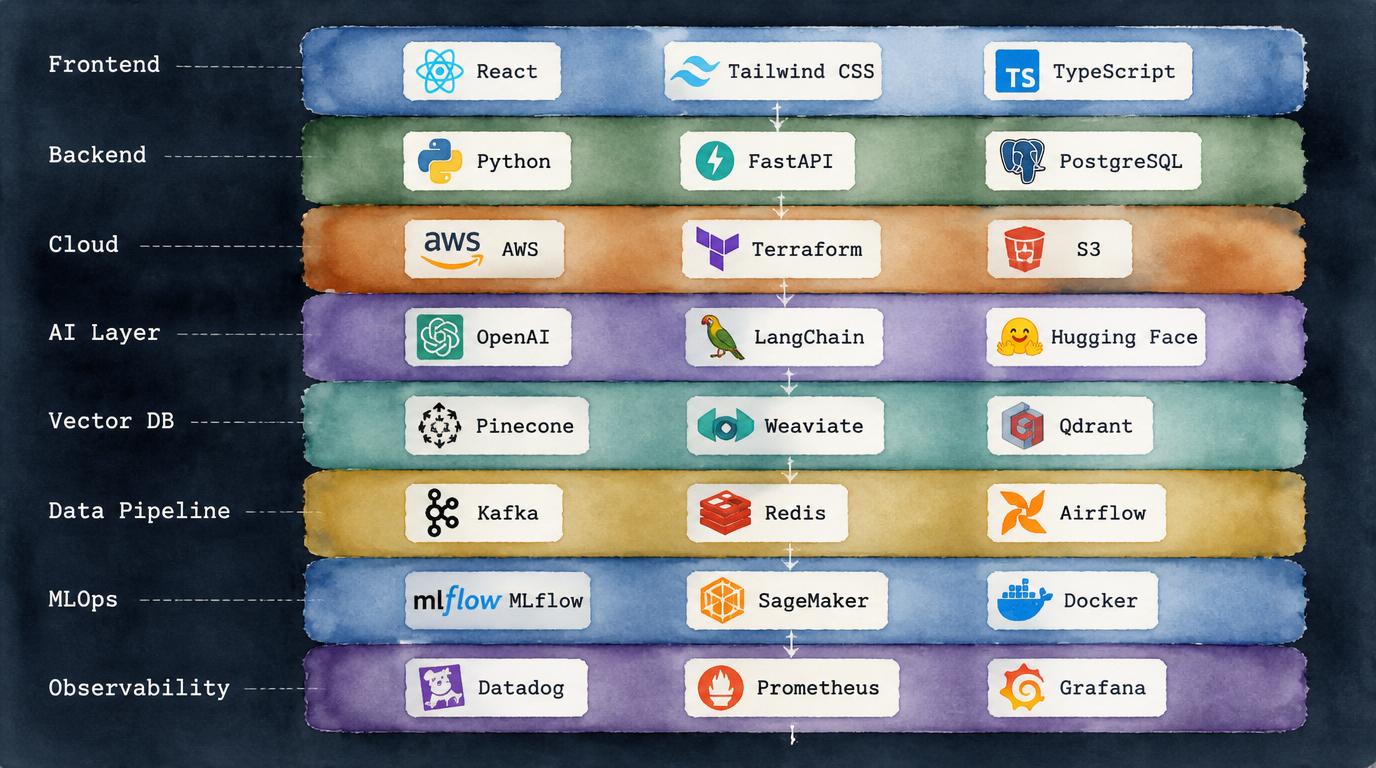
The right stack depends on your team, your cloud contracts, and your existing infrastructure. This is a reference pattern used in production enterprise AI systems—not a prescription, but a reasonable starting point for scoping conversations.
| Layer | Technologies | Notes |
|---|---|---|
| Frontend | React / Next.js | Server-side rendering for latency-sensitive AI response surfaces; streaming UI for LLM outputs |
| Backend | Python (FastAPI / Django), Node.js, Go | Python dominates AI/ML tooling; Go for high-throughput API gateways; Node.js for real-time WebSocket layers |
| Cloud | AWS / Azure / GCP | Provider choice often driven by existing enterprise agreements; Azure preferred in Microsoft-heavy orgs for OpenAI integration |
| AI / Model Layer | OpenAI API, Anthropic, open-source LLMs, scikit-learn, PyTorch | API-first for speed; self-hosted models where data residency or cost at scale demands it |
| Vector Database | Pinecone, Weaviate, pgvector, Chroma | RAG backbone; pgvector is a low-friction option if you already run PostgreSQL |
| Data Pipeline | Apache Kafka, dbt, Airflow, Spark | Kafka for real-time; Airflow / dbt for batch transformation and feature engineering |
| MLOps | MLflow, Weights & Biases, SageMaker, Vertex AI | Experiment tracking, model registry, and deployment pipelines; cloud-native MLOps reduces operational overhead |
| Observability | Datadog, Langfuse, Arize, Grafana | Langfuse / Arize specifically for LLM tracing and hallucination monitoring; Datadog for infrastructure-level metrics |
| Orchestration | Kubernetes, Docker, Terraform | Kubernetes for container orchestration; Terraform for reproducible infrastructure-as-code across environments |
Governance, Security, and Compliance
Enterprise AI deployments that skip governance work eventually create one of two problems: a security incident, or a regulatory inquiry. Neither is recoverable quickly. The good news is that governance does not have to slow development down—it just has to be designed in from the start rather than retrofitted.
The areas that require explicit design decisions in any enterprise AI system:
- Permissions and access controls — role-based access to model endpoints, fine-grained controls on what data each user or system role can query, and service account management for AI agents that take autonomous actions
- PII detection and redaction — scanning inputs and outputs for personally identifiable information before data enters external model APIs, with configurable redaction or tokenization strategies
- Audit trails — immutable logs of every AI decision, input, output, and human override—essential for regulated industries and increasingly expected by enterprise procurement
- Hallucination controls — grounding mechanisms (RAG, tool use, constrained output formats), confidence scoring, and human review thresholds that prevent low-confidence outputs from triggering automated actions
- Model risk management — frameworks for validating model behavior before deployment, monitoring for drift post-deployment, and managing model deprecation when providers change APIs
- Vendor governance — contractual controls on how third-party model providers use your data, data residency agreements, and fallback plans if a vendor changes terms or pricing
- Regional compliance — GDPR in Europe, HIPAA in US healthcare, SOC 2 for SaaS, and emerging AI-specific regulations that vary by jurisdiction and are changing rapidly
For healthcare and financial services specifically, compliance is not a checklist—it is a continuous operational requirement. See our deeper look at responsible AI in healthcare and the financial services AI investment case for sector-specific detail.
Why AI Projects Fail: An Honest List
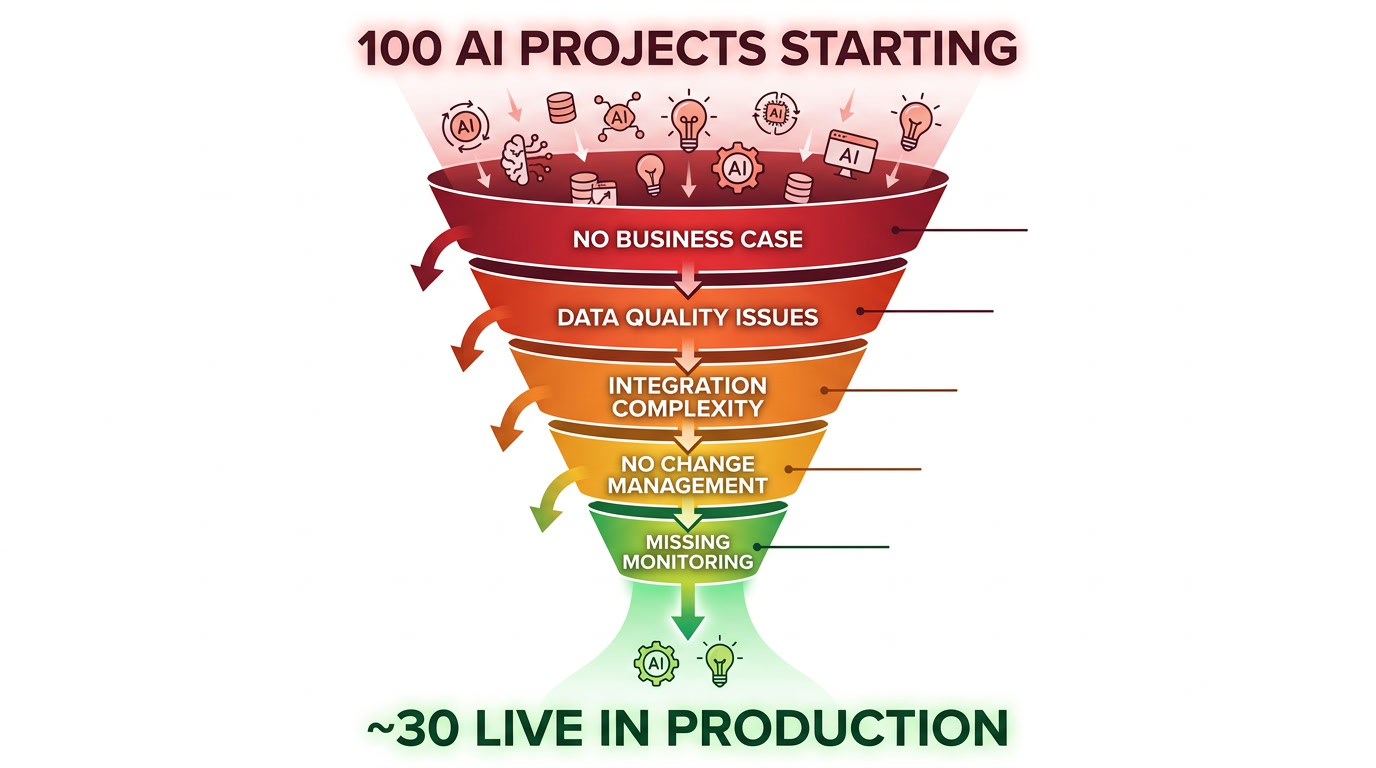
These are not theoretical failure modes. They are patterns that appear, with uncomfortable regularity, in post-mortems from AI projects that ran for six to twelve months and produced nothing in production.
- No defined business case before development starts — “Let’s explore what AI can do for us” is a research project, not a development project. Without a specific problem and a measurable outcome, there is no way to know if you succeeded.
- Data quality treated as someone else’s problem — The AI team discovers fragmented, inconsistently labeled, or simply insufficient data after the project has already started. Timeline and budget assumptions collapse.
- Choosing the most impressive technology instead of the right one — A fine-tuned LLM is not always better than a well-engineered classifier. Selecting models based on vendor marketing rather than task requirements creates technical debt immediately.
- No change management plan — The system ships, users ignore it, adoption is 12%, and the ROI case evaporates. AI products require the same adoption investment as any other new workflow tool.
- Prototype never reaches production — Integration complexity, security review, infrastructure costs, and organizational resistance collectively stop the demo from ever running on real traffic. This is the single most common failure mode.
- No designated owner for AI outcomes — When the AI team ships, they move to the next project. No one owns the cost, the accuracy, or the business metric the system was supposed to move. Drift goes unnoticed until users complain.
- Missing monitoring layer — Models degrade silently. Without automated monitoring on output quality, latency, and cost, you discover problems from user complaints rather than dashboards—by which point significant damage to trust has already occurred.
How to Choose an AI Software Development Partner
The difference between an AI development company that ships and one that delivers impressive slide decks is rarely visible on the surface. Both have good portfolios, articulate founders, and confident case studies. The questions that reveal the difference are more specific.
Questions Worth Asking
- Can you show me a system you built that runs in production today, under real load, and is monitored? (Not a demo—a live system.)
- How do you handle model drift? Who owns that process post-launch?
- What does your integration experience look like with Salesforce / SAP / our specific ERP?
- How do you scope a project when data quality is unknown at the start?
- What is your approach to compliance in regulated industries?
- How do you measure success—and who owns the KPIs after handoff?
Beyond the questions, look for four things in practice: genuine engineering depth (not resellers of off-the-shelf APIs), product thinking (they help you define what to build, not just how), enterprise integration experience (they have done the messy CRM and ERP work before), and a post-launch support model that does not disappear at go-live.
If you are evaluating AI outsourcing specifically, the questions around IP ownership, data handling across jurisdictions, and escalation paths matter even more. Our guide to software outsourcing by country covers the geography dimension in detail.
The full delivery picture—mobile development, UI/UX design, backend infrastructure, and web development—often needs to sit alongside AI work rather than replace it. Very few AI use cases operate in isolation from a broader product.
AI Use Case ROI Comparison
Not all AI use cases are equal. The table below reflects what teams with production experience consistently observe across industries—time-to-value, typical investment range, and the primary ROI driver for each use case type.
| Use Case | Time to Value | Typical Investment | Primary ROI Driver | Complexity |
|---|---|---|---|---|
| Document processing automation | 6–10 weeks | $40K–$120K | Cost per transaction reduction | Medium |
| Customer support AI agent | 8–14 weeks | $60K–$180K | Ticket deflection rate | Medium–High |
| Sales lead scoring | 6–12 weeks | $30K–$90K | Conversion rate improvement | Medium |
| Fraud detection | 12–20 weeks | $120K–$400K | Fraud losses avoided | High |
| Internal knowledge copilot | 8–12 weeks | $50K–$150K | Employee time saved | Medium |
| Demand forecasting | 10–16 weeks | $80K–$250K | Inventory and planning efficiency | Medium–High |
| Personalization engine | 14–24 weeks | $150K–$500K | Engagement and conversion lift | High |
| Enterprise AI platform (multi-use case) | 6–18 months | $500K–$2M+ | Operational transformation | Very High |
The Real Value of AI Is Not the Demo
The most important thing a CTO or founder can do before starting an AI project is ask a simple question: what changes in our business when this system is running? Not what the demo shows. What actually changes—in cost, revenue, speed, or quality—when real users are interacting with it under real conditions.
If the answer is clear, specific, and measurable, the project has a foundation. If the answer is vague—”we’ll be more innovative,” “it’ll give us a competitive edge”—that is a signal to do more strategy work before writing a single line of code.
Agentic AI systems are already changing what production deployment looks like—models that take multi-step autonomous actions rather than answering questions require a different governance and monitoring architecture entirely. The fundamentals covered here still apply; the stakes are higher.
Custom AI software development done well is a combination of product thinking, engineering discipline, and business pragmatism. Strategy without execution stays a slide deck. Execution without strategy builds the wrong thing efficiently. The companies getting meaningful returns from AI are doing both—and they are shipping to production, not just to demos.