



Every founder gets the same warning before they write a line of code: “move fast now, pay for it later.” Most of them accept that trade blindly, because the alternative — a six-month build that misses the funding window or the customer’s patience — feels worse. Here’s the part nobody tells them: you don’t actually have to choose between speed and a codebase you can live in. You have to choose between debt that compounds and debt that doesn’t. That’s it. That’s the whole game.
Some MVPs turn into Series A products without ever needing a rewrite. Others get burned down eighteen months in, not because the team moved too fast, but because they cut the wrong corners. The difference has never been speed — it’s which shortcuts were taken and which were avoided. This guide is the tactical map most founding teams never get handed early enough: a step-by-step blueprint for the architecture itself, a hard line between shortcuts that save money and shortcuts that quietly bankrupt the company, and rules of thumb engineers can apply mid-sprint, without convening a whiteboard session.
The Strategic Blueprint: Building the MVP Skeleton
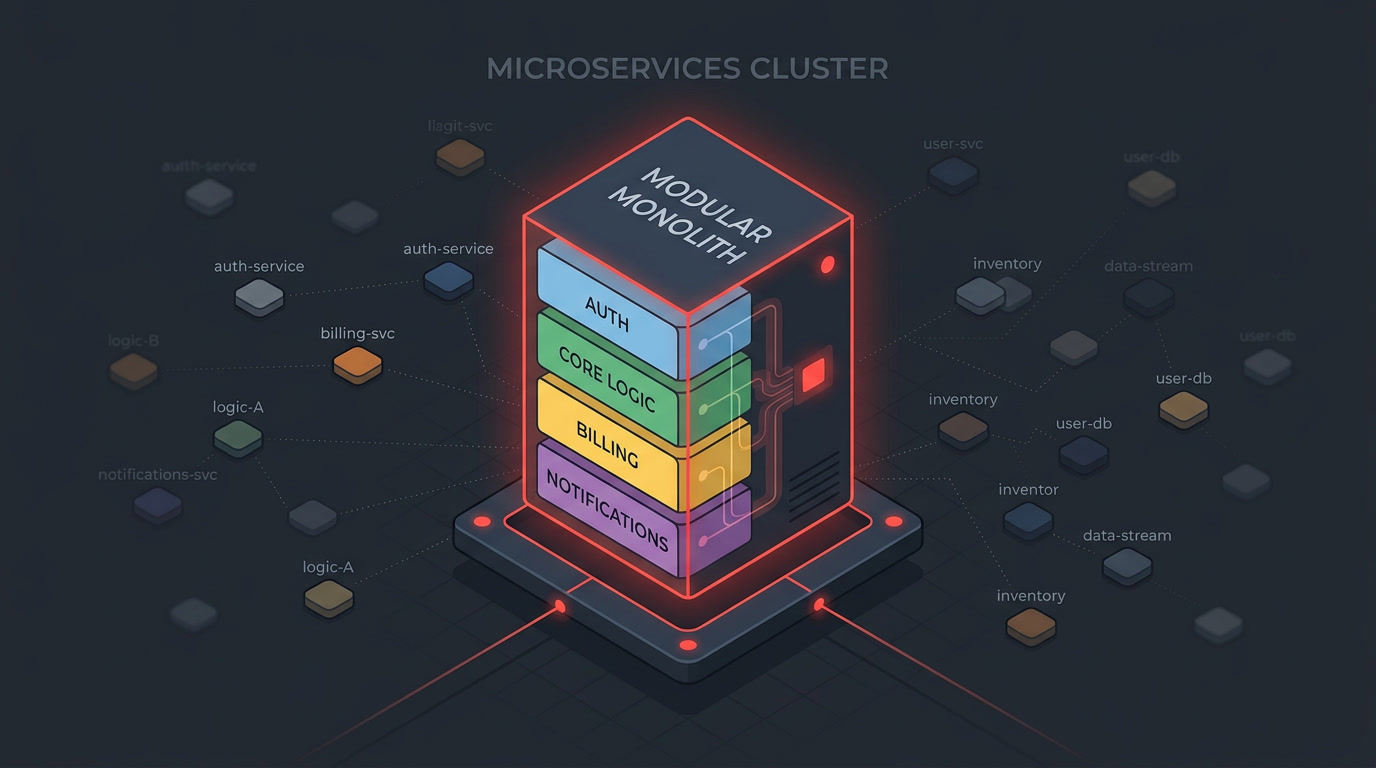
Before any shortcut decision matters, the skeleton has to be right. Get the skeleton wrong and no amount of clean code inside it will save the product — the team ends up re-platforming instead of iterating. Here’s the order of operations experienced architecture teams follow on nearly every MVP engagement.
Step 1: Draw the scope boundary in ink, not pencil
The single biggest source of “technical debt” isn’t bad code — it’s scope creep disguised as a feature request three weeks before launch. Before anyone opens an IDE, define the north star user journey: the one sequence of actions that proves your value proposition, end to end. Everything that doesn’t serve that journey gets a “v2” label and a place in the backlog, not a place in the sprint.
Write this boundary down somewhere the whole team can see it — a one-page doc, not a Jira epic buried six clicks deep. When someone (often the founder) says “can we just also add,” the doc is what lets an engineer say “yes, in the v2 column” without it turning into a political fight. If you’re still shaping what that MVP scope should even include, our breakdown on building an effective MVP to kickstart your business walks through the prioritization exercise in more depth.
Step 2: Choose the boring monolith over microservices
Here’s the unpopular truth: if a team is pre-product-market-fit, microservices are a form of technical debt, not a defense against it. They’re sold as the “scalable” choice, but for an MVP they mean distributed transactions, service discovery, network latency debugging, and a deployment pipeline for every service — all overhead your two-to-four-person team pays for before you have a single paying customer.
Build a modular monolith instead: one deployable unit, internally organized into clean, decoupled modules (billing, auth, core-domain-logic, notifications) with well-defined interfaces between them. This gets you 90% of the benefit people actually want from microservices — separation of concerns, testability, the ability to reason about one module without reading the whole codebase — without any of the operational tax.
| Factor | Modular Monolith (MVP-appropriate) | Microservices (premature at MVP stage) |
|---|---|---|
| Time to first deploy | Days | Weeks (infra + orchestration setup) |
| Team size needed to operate | 1–4 engineers | Typically 6+ before it’s sane |
| Debugging a production issue | One stack trace, one log stream | Distributed tracing across services |
| Cost of a wrong domain boundary | Rename a folder, move a file | Rewrite an API contract, redeploy two services |
| Infra bill at low traffic | One server, one database | Multiple containers, service mesh, message broker |
| Path to scale later | Extract modules into services once traffic demands it | Already there, but you paid the tax with zero users |
The monolith isn’t the “unsophisticated” choice — it’s the choice that lets you refactor domain boundaries for free while you’re still figuring out what your domain actually is. Our guide on building scalable SaaS architectures covers exactly when and how to split the monolith once you have real traffic patterns to design around.
Step 3: Wrap every external API behind a service layer
This is the single highest-leverage architectural decision you’ll make, and it costs almost nothing upfront. Every third-party integration — Stripe, Twilio, SendGrid, your AI provider, your identity provider — goes behind an internal adapter/wrapper interface. Your application code never calls the vendor SDK directly; it calls your own interface, which calls the vendor underneath.
[ Your App Logic ]
         │
         ▼
[ PaymentService interface ]   ← your code depends on THIS
         │
         ▼
[ StripeAdapter implementation ]  ← vendor-specific code lives ONLY here
         │
         ▼
[ Stripe SDK / API ]
Why this matters more at MVP stage, not less: MVPs pivot. You will swap payment processors, switch your AI model provider, or replace your email vendor at least once before Series A, usually because of pricing or a feature gap you didn’t foresee at day one. If Stripe-specific objects and error codes are scattered across forty files, that swap is a two-week project. If they’re isolated behind one interface, it’s a two-day project — you rewrite the adapter, the rest of the app doesn’t know anything changed. This same wrapper pattern is why our open banking API integration work and our payment gateway implementations hold up under vendor changes without touching core business logic.
Step 4: Lock your core data model contracts before you lock anything else
Code is cheap to change. Data is not. A wrong function name costs you a find-and-replace. A wrong foreign key relationship, once you have production rows depending on it, costs you a migration script, a maintenance window, and a very uncomfortable conversation about downtime. Spend real design time — a few hours with a whiteboard, not a few days — on your core entities and their relationships before writing the first migration. This is the one place in an MVP where “we’ll fix it later” is the most expensive sentence in the English language.
The Core Distinction: Good Debt vs. Bad Debt
“Technical debt” gets used as a catch-all for “code someone doesn’t like,” which is unhelpful. The financial metaphor is actually precise if it’s taken seriously: debt is fine when you know the interest rate, you know when you’ll pay it off, and it’s financing something valuable. Debt is a trap when the interest rate is invisible and it compounds against parts of the system you can’t easily replace.
| Good Debt | Bad Debt | |
|---|---|---|
| Where it lives | UI polish, non-critical automation, admin tooling | Data schema, security boundaries, core business logic |
| Interest rate | Fixed and known — costs the same to fix in month 8 as month 1 | Compounding — every new feature built on top makes it costlier to fix |
| Who’s affected | Internal team, tolerable UX rough edges | Customer data integrity, other engineers’ ability to ship |
| Payoff plan | “We’ll build the automation once we have 50 customers doing this manually” | Often has no plan at all — it’s discovered, not decided |
| Example | Hardcoded plan tiers in a config file instead of a full billing engine | Storing money as a float instead of an integer (cents) |
The practical test that cuts through the debate fastest: “If this is never paid down, does the company still survive?” Good debt — an admin dashboard that’s a raw SQL query in a Retool app instead of a polished internal tool — the answer is yes, indefinitely, if needed. Bad debt — no row-level tenant isolation in a multi-tenant schema — the answer is no, and the day you find out is the day a customer sees another customer’s data.
Disposable Code vs. Messy Code: A Distinction Most Teams Miss

This is the idea that reframes the entire “move fast” conversation, so it’s worth sitting with. Disposable code is code you write on purpose to be deleted — a one-off script, a hardcoded onboarding flow for your first five design-partner customers, a manually-triggered report instead of a scheduled job. It’s not messy; it’s scoped correctly for what it’s solving, and everyone on the team knows its lifespan.
Messy code is different. It’s code that was meant to be permanent but was written without the design discipline permanence requires — tangled dependencies, business logic bleeding into UI components, no tests around the parts of the system that touch money or auth. Messy code doesn’t get cheaper to fix later. It gets more expensive, because every sprint someone else builds on top of it, and now the fix touches five files instead of one.
The tell that separates them: disposable code is isolated. It doesn’t leak into your core modules; you can delete the file and nothing else breaks. Messy code is entangled — deleting it means untangling everything that grew around it. When deciding whether a shortcut is acceptable, the real question isn’t “is this good code” — it’s “can this be deleted without a scalpel?“
Smart Shortcuts vs. Dangerous Shortcuts
Here’s the breakdown seasoned engineering leads apply in sprint planning, sorted by where the corner is being cut.
Smart Shortcuts (safe to take, low interest rate)
- Manual operations behind the scenes. Refunds, plan upgrades, or onboarding a design-partner customer by hand in an admin panel instead of building a self-serve flow. Nobody outside your team ever sees this seam.
- UI component libraries over custom design systems. Ship with shadcn/ui, Chakra, or Material instead of hand-rolling every button and modal. You can theme or replace it once the product justifies a custom design language — the interface layer is the cheapest layer to redo.
- Third-party auth instead of a home-grown identity system. Auth0, Clerk, or Supabase Auth over rolling your own password hashing, session management, and OAuth flows. Security-critical, low-differentiation code is exactly what you should outsource at MVP stage.
- Synchronous jobs instead of a queue. If an operation takes two seconds and runs for ten users a day, a background job queue (Sidekiq, BullMQ, Celery) is premature. Run it inline and add the queue when volume actually demands it.
- A single hosted database instead of a sharded or multi-region setup. One well-indexed Postgres instance handles far more load than founders assume before they’ve measured it.
- Feature flags via a config file instead of a full flagging platform. LaunchDarkly is great — at 40 customers, a JSON config with boolean flags does the same job for free.
Dangerous Shortcuts (the ones that ruin the app)
- Sloppy or untyped database schemas. Nullable columns with no constraints, no foreign keys, storing structured data as loose JSON blobs “to stay flexible.” This is the shortcut with the highest compounding interest rate in software — every table built downstream inherits the ambiguity.
- Hardcoded values inside business logic instead of configuration. Tax rates, plan limits, or trial lengths baked directly into
ifstatements scattered across the codebase. The first time you need to change a number, you’re grepping the entire repo and praying you found every instance. - No tenant isolation in multi-tenant data models. Filtering by
tenant_idin application code instead of enforcing it at the database or query-builder layer. One missedWHEREclause and you’ve leaked customer A’s data to customer B — a trust failure, not a bug. - Skipping authentication or authorization checks “temporarily.” Anything that starts as “we’ll lock this endpoint down before launch” and doesn’t make it into a ticket. It always ships open.
- No automated tests around money-moving or state-changing logic. You can skip tests on your marketing site. You cannot skip them on your billing engine, your subscription state machine, or anything that touches a customer’s payment method.
- Copy-pasting logic instead of extracting a shared function — specifically for security-sensitive code. Duplicated permission checks are the classic way one gets updated during a fix and the other three don’t.
Rules of Thumb: Deciding If a Shortcut Is Worth It
When you’re mid-sprint and a shortcut is tempting, you don’t have time for a full debt-vs-value analysis. Use these instead:
- The “can this be deleted in one file?” test. If removing the shortcut later means deleting or rewriting one isolated file, take it. If it means touching five modules, skip it.
- The “does it touch money, auth, or other people’s data?” test. If yes, there is no acceptable shortcut version — build it right the first time, even if it’s slower. This is the one category where “later” is not a real plan.
- The “will this customer still be around in six months?” test. Manual, disposable solutions are fine for design partners and early adopters the team is actively learning from. They’re not fine for anything a paying customer at scale will hit.
- The 10x rule. If the shortcut saves you a day now but costs more than ten days to unwind after you have real usage data, it’s bad debt dressed up as a good decision. Most schema shortcuts fail this test; most UI shortcuts pass it easily.
- The “would this hold up in a due-diligence data room?” test. Sounds dramatic for an MVP, but it’s a genuinely fast gut-check. If an investor’s technical advisor reviewing the auth flow or the schema would raise an eyebrow, fix it now — that conversation happens sooner than founders expect.
A Pre-Launch Debt Audit, in Five Minutes
Before shipping v1 to the first real cohort of paying users, run through this checklist. It’s not exhaustive — it’s the short list of items that are cheap to fix today and expensive to fix after data starts accumulating on top of them.
- Tenant isolation is enforced at the query layer, not just in application code. A missing filter anywhere in the app should be structurally impossible, not just unlikely.
- Every external vendor call goes through an internal adapter, with zero vendor-specific imports outside that adapter.
- Money is stored as integer cents (or the smallest currency unit), never as a float.
- Every config value that could plausibly change — trial length, plan limits, tax rules — lives in configuration, not inline in logic.
- Auth and permission checks exist on every state-changing endpoint, with no “temporary” exceptions left in the code.
- The core data model has been reviewed by at least one engineer who didn’t write it. A second set of eyes on schema design catches assumptions the original author stopped noticing.
If every item on that list is true, most of what remains genuinely is good debt — the kind that’s fine to carry.
Bringing In Help Without Losing the Plan
None of this requires a large team. It requires the right sequencing and someone who’s made these calls before and can tell good debt from bad debt in real time, not in a postmortem. That’s the gap a fractional or embedded senior engineer closes fastest — which is why CTO-as-a-service engagements exist specifically for this stage: someone who sets the architectural boundaries in week one so the team you hire after doesn’t inherit a mess to untangle.
If you’re scoping the build itself, our SaaS development services team runs MVPs through exactly this framework — modular monolith first, wrapped integrations, disposable code kept disposable — and our software cost estimation guide is a useful next read if you’re trying to put a number on the build before you commit to a timeline. And once you’re past MVP and looking at your first real scaling decisions, the multi-tenant platform architecture breakdown picks up exactly where this guide leaves off.
The MVPs that survive to Series A aren’t the ones that avoided shortcuts. They’re the ones where someone senior enough drew the line correctly — every single time — between the corner that saves you a week and the corner that costs you the company.